Skip to content

Whippen Scheduler

In use

From roll marking to payroll. Automatically.

No separate timesheets. No double handling. Just mark the roll and let Whippen prepare the rest.

Scheduler runs the week-to-week work of a school's music, performing arts, and co‑curricular programs, from the timetable to the fortnightly payroll.

In use at our founding NSW school since May 2026

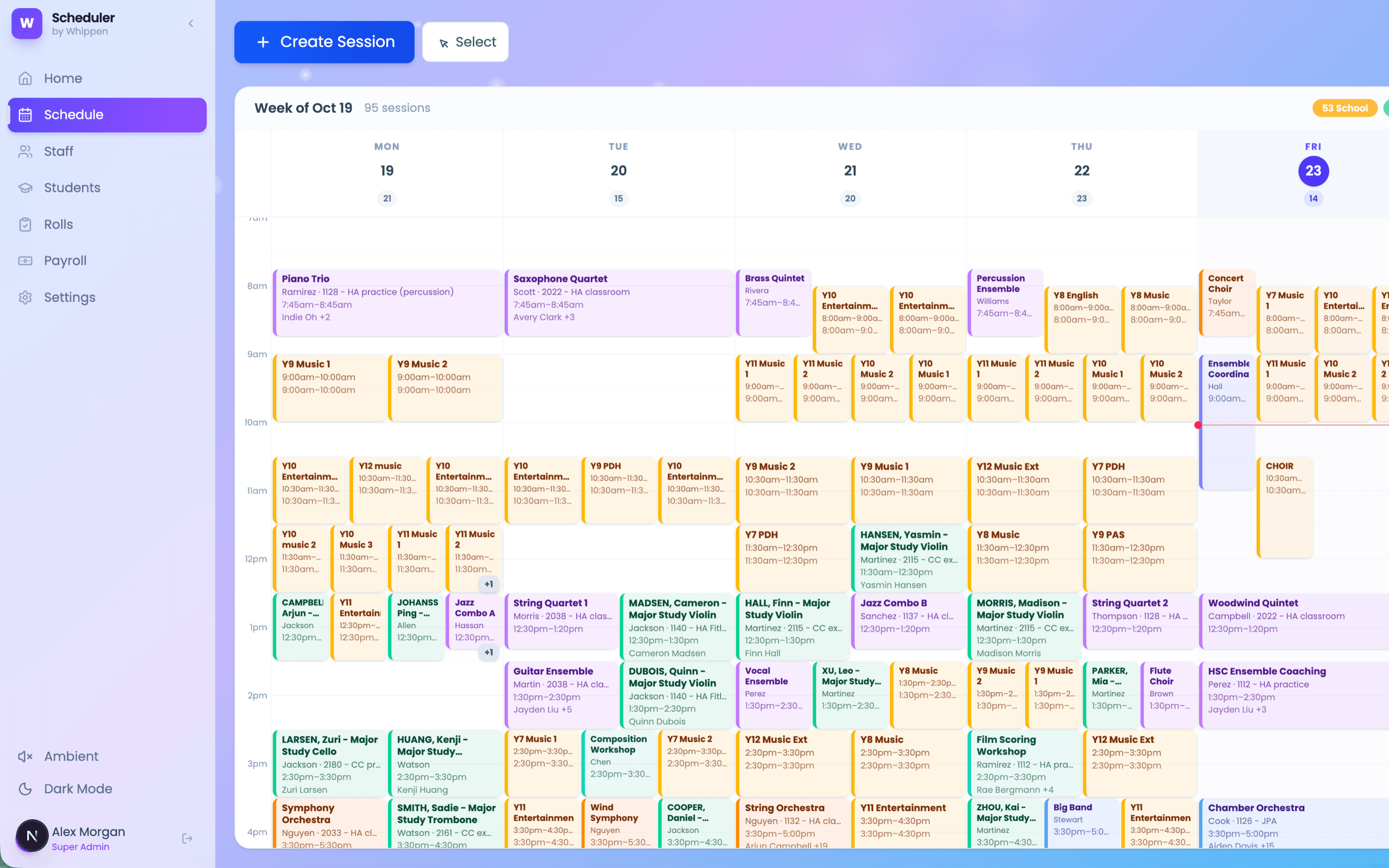
The weekly schedule in Scheduler, showing lessons and rehearsals
schedule views, from a single day to a whole month
5
timesheets for tutors to fill in
0
tap for a tutor to confirm an ensemble rehearsal
1
when our founding school switched over completely
May 2026

Why Scheduler

Less administration. More time for education.

Three things Heads of Music, administrators, and business managers notice first.

Whole-term scheduling

A whole term of lessons. One simple workflow.

Forget building instrumental lesson schedules one week at a time. Set up a lesson once, with its tutor, students, room, and time, and Whippen schedules it every week or fortnight for the rest of the term.

Any dates that fall in the school holidays are flagged, and can be moved with a click.

Less time scheduling. More time teaching.
Automatic clash detection

Catch scheduling conflicts before they become problems.

Managing hundreds of instrumental lessons alongside classes, rehearsals, and ensembles can quickly become complicated.

Whippen automatically checks every new or moved session for room, tutor, and student clashes. It suggests free rooms, and alternative times when you're editing a session.

Spend less time manually checking timetables and more time managing your music program.

Smarter scheduling. Fewer surprises.

Roll marking to payroll

Roll marking that flows straight into payroll.

Tutors mark the roll once, and their completed sessions flow straight into payroll preparation.

No separate timesheets, no double handling, and no chasing tutors at the end of the pay period.

Mark the roll. Payroll is prepared.

How it works

Start with Scheduler alone

There's no need to take on the whole Whippen suite. Add other modules, such as Examiner, only if and when you need them.

Competitive pricing

Priced for schools, with a quote tailored to yours. Ask us when you book a demo.

Switching from Clipboard?

Our founding school replaced Clipboard with Scheduler in May 2026.

How the switch worked

Whole-term scheduling

Plan an entire term. In one go.

Schedule weeks of lessons in a single workflow. Whippen automatically highlights school holidays and lets you review, adjust or remove individual dates before confirming your schedule.

  • School holiday dates flagged automatically.
  • Change or remove any individual date.
  • Confirm once to create the whole series.
Plan recurring lessons across the term, with school holiday warnings built in.
Planning session dates in Scheduler: 14 weekly lessons, with the six that fall in the summer holidays flagged

“Much easier to see the whole term... A total gamechanger!”

Music Admin Manager

How it works

The roll is the timesheet.

Most programs keep the schedule, the rolls, and the timesheets in separate places and reconcile them by hand. In Scheduler they're the same record. When tutors mark their rolls, their completed sessions flow straight into payroll preparation, with nothing to re-enter.

  1. Schedule

    Lessons, ensembles, and rehearsals are set up once, as one-offs or recurring series, with clashes flagged as you go.

  2. Mark the roll

    Tutors mark each student present or absent on their phone, or confirm an ensemble with one tap. Actual start and finish times are recorded too.

  3. Confirm the hours

    Sessions that ran to time are approved automatically. Anything that ran more than five minutes over or under is flagged for a person to check.

  4. Prepare payroll

    Each fortnight, a pay run is prepared from the confirmed sessions at each tutor's pay grade, with consistent rules for cancellations and absences, ready for finance to review.

Whippen prepares payroll. It doesn't pay staff. Your finance team reviews the prepared pay run, approves anything flagged, and makes payments through your school's existing payroll system.

The whole program, at a glance

  • Five views of the same schedule: day, week, month, agenda, and rooms.
  • Drag a session to move it, or drag its edge to change its length.
  • Recurring series are managed in one place.
  • Each week is labelled with its school term and week number.
The weekly schedule in Scheduler, showing lessons and rehearsals

Rolls marked where the lesson happens

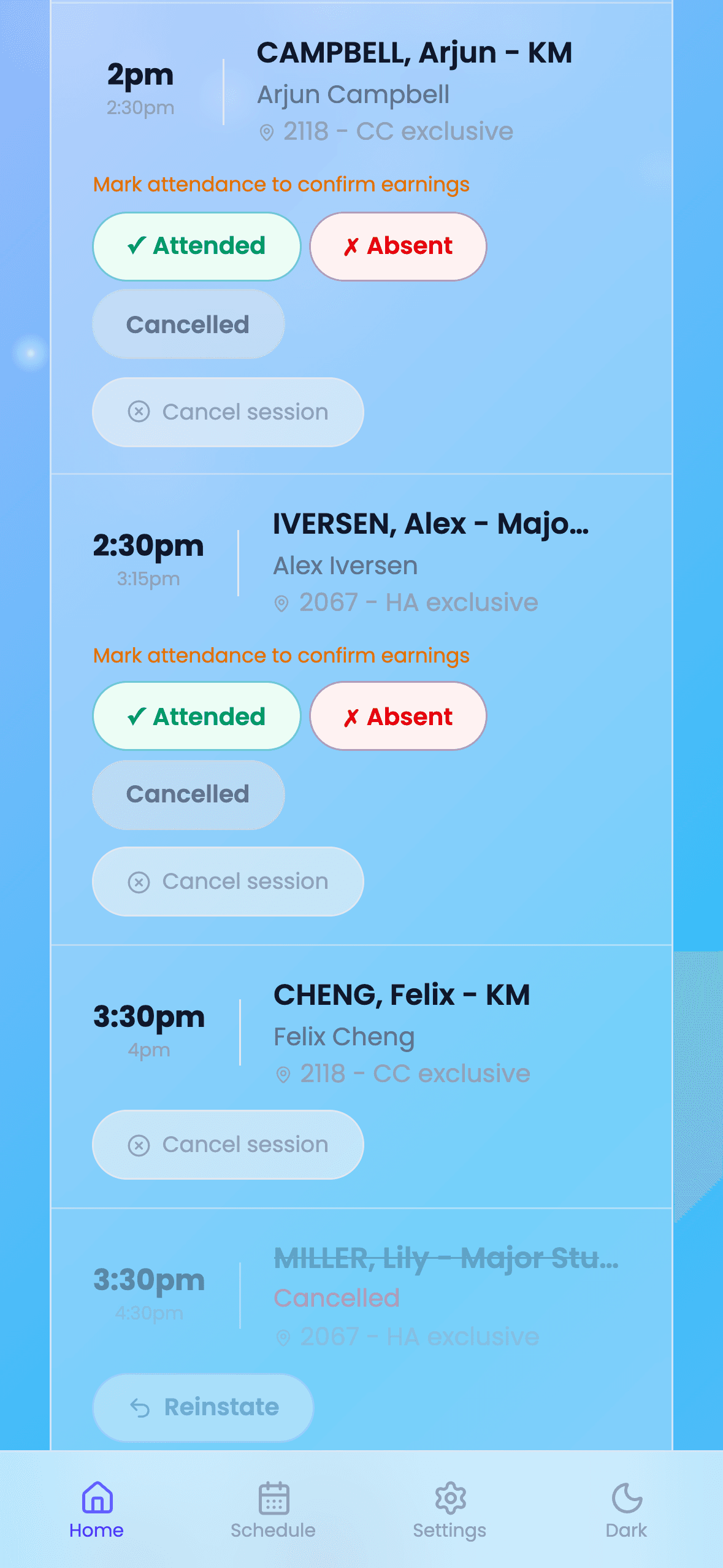
  • Present, absent, or cancelled for each student in an individual lesson, with undo.
  • An "I was there" button for ensembles and rehearsals.
  • Unconfirmed sessions are flagged on the tutor's home screen until they're done.
  • Coordinators see every unmarked roll and can remind tutors in one go.
A tutor marking a roll in Scheduler on a phone

Payroll, prepared from the rolls

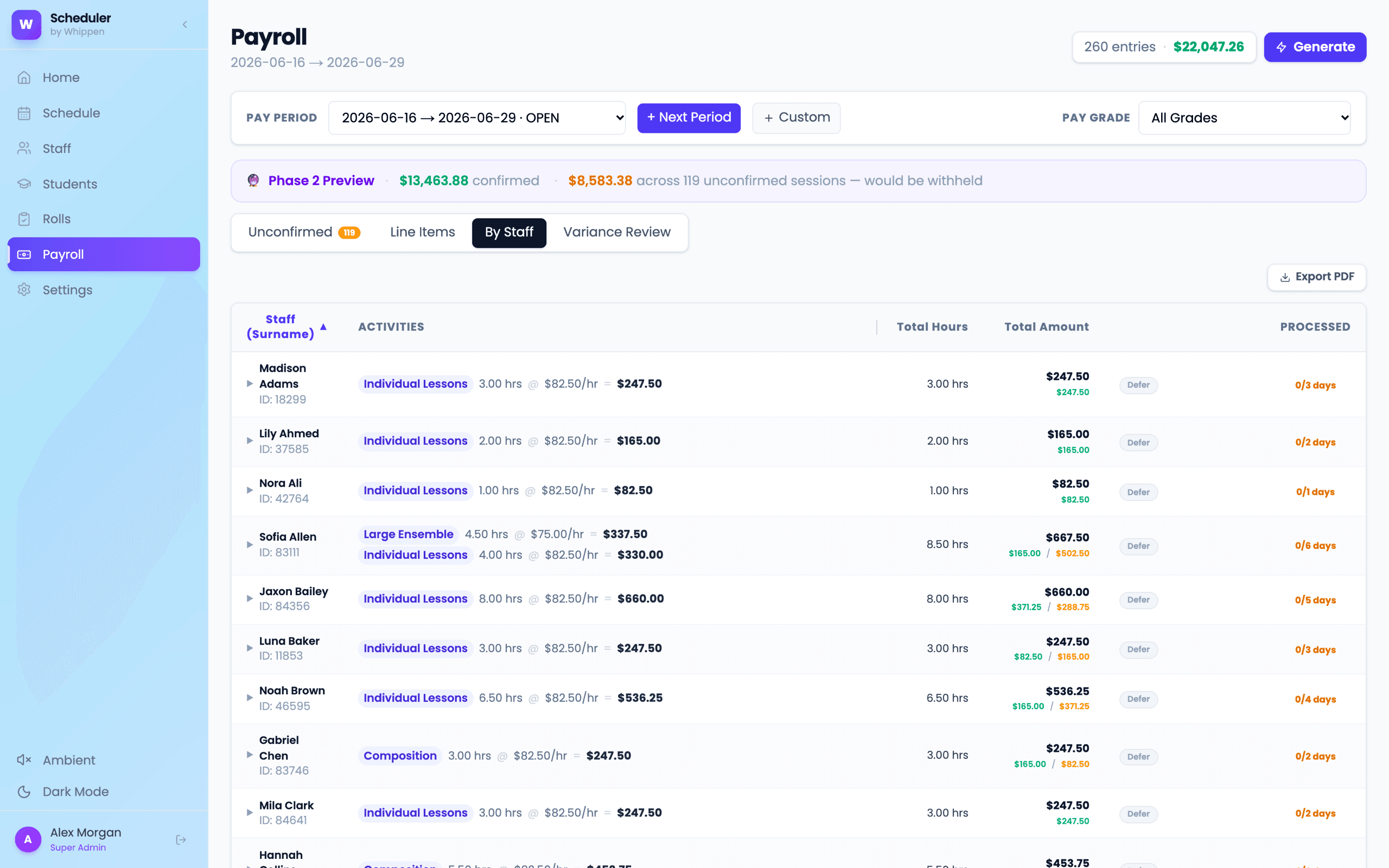
  • Timesheets for each fortnightly pay period, generated in one step.
  • Each tutor's rate comes from their pay grade for that activity. Pay rates are visible only to finance staff.
  • Cancelled sessions aren't paid, and explained absences follow a 24-hour notice rule. Sessions that ran long or short wait for approval.
  • A breakdown by tutor and activity for every pay period, down to each session.
  • Safe to re-run: approvals and checks already made are kept.
Payroll in Scheduler for a pay period, broken down by tutor and activity

A tutor's day, in their pocket

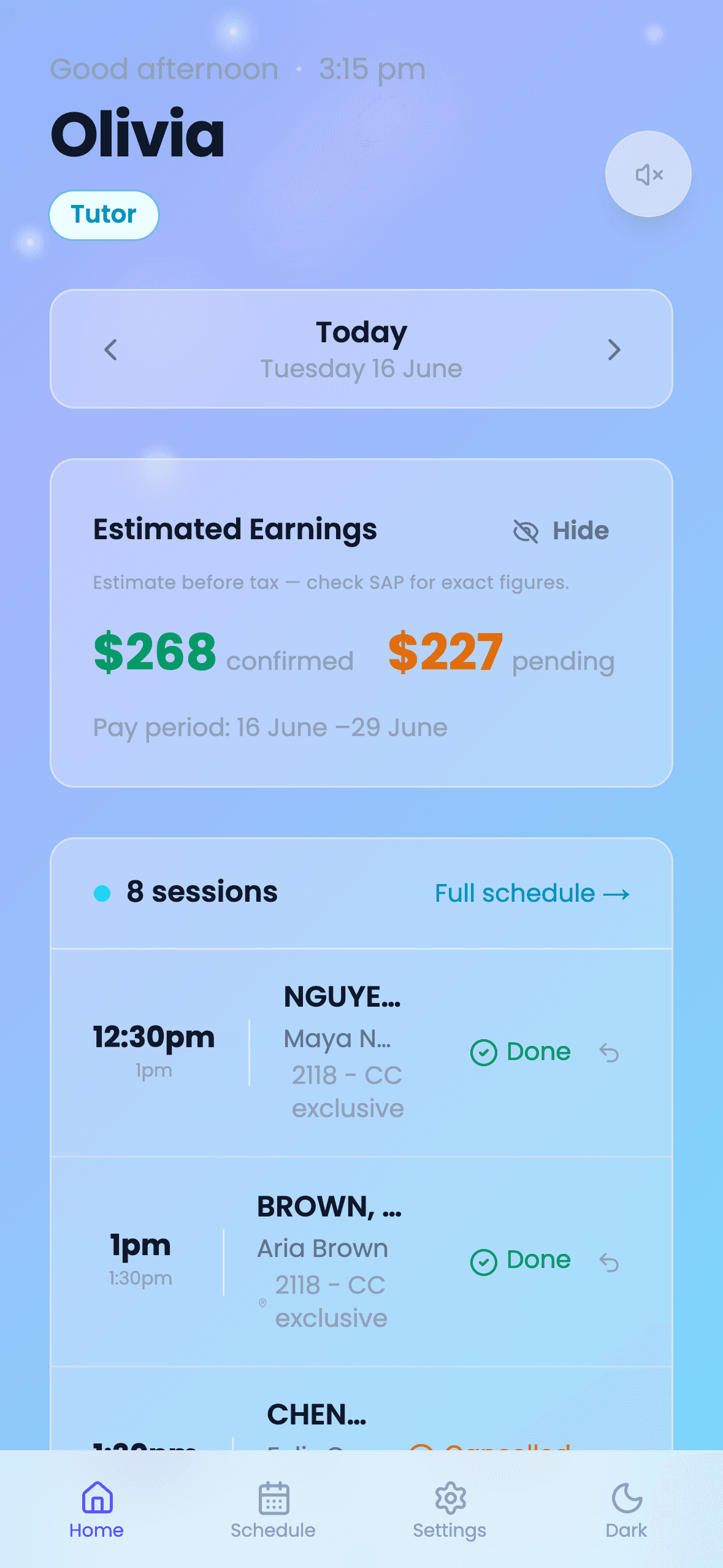
  • Today's sessions in order, with a swipe to move between days. Installable to the phone's home screen.
  • Confirmed and pending earnings for the pay period, hidden until they tap to see them.
  • Their schedule can also appear in Apple, Google, or Outlook Calendar through a private subscription link.
  • Staff are notified by email when a session they're on changes.
A tutor's day in Scheduler on a phone, with sessions and confirmed earnings

Switching systems

Proven in a real switch-over

In May 2026, our founding school, a NSW specialist music high school, replaced its existing scheduling system, Clipboard, with Scheduler. Changing systems during the school year is a real concern, especially when pay is involved, so the move was made in careful steps:

  1. Bring the schedule across

    The existing timetable was imported from the previous system's spreadsheet export, rather than re-entered by hand.

  2. Run both side by side

    Both systems ran in parallel while staff moved across, tutor by tutor.

  3. Check the pay before switching

    Payroll was compared line by line against the previous system's before the switch.

Every school's timetable and pay arrangements are different, so we'll plan the timing and steps of your move with you rather than assume one approach fits all.

See your program in Scheduler

We'll walk you through a week from a coordinator's, a tutor's, and a business manager's point of view, and talk through how your current schedule would come across.

Book a Scheduler demo

Ready to adopt it at your school? Explore the Pilot School Program